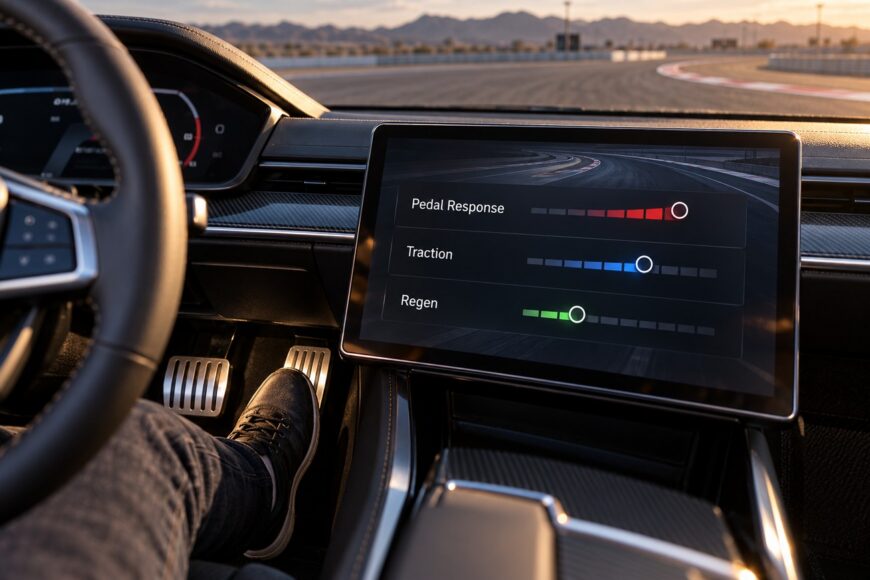
“Custom track mode maps” can describe several unrelated functions: accelerator response, regenerative braking, traction and stability logic, or display cards that rearrange information on the screen. The label may sound like a complete performance mode, although the vehicle may only be changing how quickly torque is requested or how strongly the car slows when you lift off.
The useful choice is between sharper response and predictable control. One-pedal behavior, Auto detection, battery conditions, road grip, and the selected drive mode can all change the result. Treat the name as a starting point, then verify the actual parameters and restrictions in the vehicle’s settings and official documentation.
- What “custom track mode maps” actually change
- Pedal, regeneration, and traction settings: what each map changes
- Why one-pedal and Auto modes do not behave like a fixed brake map
- Traction maps on dry, wet, and low-grip surfaces
- How to build and test a usable custom map
- Common mistakes, marketing claims, and model-specific limits
- Frequently asked questions
- What cars have track mode?
- What does Tesla Track Mode do?
- Why can the same custom map feel different from one drive to the next?
What “custom track mode maps” actually change
A pedal map changes the relationship between accelerator travel and requested torque. A sharper map can make the car respond earlier to a small pedal movement, while a softer map gives you more travel for the same gradual increase. This changes control feel and precision; it does not automatically create more available power.
Regeneration is a separate function. It determines how much deceleration the electric drive system requests when you lift off and whether the car blends in friction braking when more braking force is needed. One-pedal driving may use this function prominently, but one-pedal mode and a full track-oriented drive profile are different concepts.
Traction and stability settings operate at another layer. They can influence wheel-slip control, torque reduction, and the point at which electronic intervention becomes noticeable. The available controls depend on the vehicle, drive mode, road conditions, and software, so a “traction map” with the same name can produce different behavior in different vehicles.
Display cards and profiles can create another source of confusion. A card may show energy use, range, audio, or control information, or provide shortcuts to settings, without changing vehicle dynamics. Official documentation may list one-pedal driving, regeneration, drive profiles, and display cards as separate functions; check the exact parameters shown in the settings screen before judging what a custom mode does.
Pedal, regeneration, and traction settings: what each map changes
The following comparison separates the functions that are often bundled under custom or track terminology. It is model-neutral: the same setting name does not guarantee the same intervention or available adjustment in every vehicle.
| Setting | Driver-facing effect | Useful scenario | Main risk | What it does not guarantee |
|---|---|---|---|---|
| Accelerator sensitivity | Requests torque earlier or later through the pedal travel. | Sharper response for deliberate inputs or smoother control in traffic. | Abrupt torque delivery can unsettle the car on low-grip surfaces. | It does not create more available power or improve tire grip. |
| Lift-off regeneration | Changes deceleration when the accelerator is released. | Reducing pedal changes during ordinary urban driving. | The result can vary with speed, battery conditions, road grip, and system logic. | It does not replace the brake pedal for strong or sudden braking. |
| Traction and stability intervention | Changes how the vehicle limits wheel slip or reduces torque. | Balancing response and stability within the limits of a specific drive mode. | A permissive setting can allow more wheel slip than the surface supports. | It does not guarantee track behavior, maximum grip, or identical intervention on every road. |
| Display or profile settings | Changes widgets, shortcuts, or the presentation of energy and control data. | Keeping relevant information visible while driving. | A dynamic-looking interface can be mistaken for a performance calibration. | It may change no vehicle dynamics at all. |
Why one-pedal and Auto modes do not behave like a fixed brake map

Lift-off deceleration is a drive-system response, while braking is a broader safety function. Regenerative braking has priority in one-pedal operation, and disc brakes can be added when necessary. The amount of deceleration available from releasing the accelerator remains limited, so the brake pedal is still required for strong or sudden braking.
The Volvo EX90 provides a clear model-specific example of operating-position limits. One-pedal mode operates in D or R; in N, releasing the accelerator does not apply braking. This matters during parking, towing-related procedures, or any situation in which the driver expects the same lift-off response after changing the selector position.
Auto can sound like a permanent one-pedal setting, but its behavior is conditional. In the Volvo example, Auto provides lift-off deceleration when a vehicle is detected ahead. Without a detected vehicle, the expected one-pedal deceleration may not occur, leaving the driver to use the brake pedal for ordinary stopping or speed control.
Detection depends on the vehicle’s sensors and operating logic. Camera and radar systems can be limited by weather, road conditions, and traffic context, so a detected target should never be treated as a guaranteed braking reference. The practical habit is simple: keep your foot ready for the brake whenever the required deceleration is uncertain.
Traction maps on dry, wet, and low-grip surfaces
A sharp accelerator map can feel accurate on dry pavement because the tires have more grip available for the requested torque. The same pedal movement on a wet, icy, or loose surface can produce a faster change in wheel demand than the driver intended. A nervous feel may come from the combination of pedal sensitivity and reduced grip rather than from a fault in the traction system.
Lift-off behavior also matters. Strong regenerative deceleration can alter the balance of the car when the accelerator is released, especially during a turn or on a split-grip surface. Traction and stability behavior depends on the vehicle, selected drive mode, and road conditions; a nominally identical map name does not guarantee identical intervention.
Volvo does not recommend one-pedal driving on slippery roads. In the cited Volvo documentation, one-pedal mode is disabled in Off-road mode. These restrictions show why a setting that feels efficient and predictable in urban driving should not be treated as a universal wet-weather or low-grip calibration.
Auto adds another variable because its lift-off behavior depends on detection logic. Weather, road spray, poor visibility, unusual traffic positioning, and road conditions can affect camera and radar performance. The selected map therefore describes an intended behavior, while the vehicle’s control logic determines what is actually permitted in the moment.
Use a gentler response and a predictable braking strategy when grip is uncertain. Leave more space, avoid abrupt accelerator releases in a corner, and use the brake pedal when you need a clearly commanded reduction in speed. Electronic assistance can help manage traction, but it cannot supply grip that the surface does not provide.
How to build and test a usable custom map
Start by identifying what the menu actually changes. Record whether the adjustment affects accelerator sensitivity, regeneration, traction or stability intervention, driver assistance, or only the display. If the screen uses a broad label such as custom or track, consult the manual and look for explicit descriptions of each parameter.
Begin with a moderate accelerator response. A setting that feels exciting during one acceleration run may become tiring in traffic or difficult to meter on a wet exit. Choose regeneration deliberately as well: decide whether you want gentle coasting, stronger lift-off deceleration, or conditional Auto behavior, then test the result separately from acceleration.
Change one parameter at a time and record the response in D, R, and N where relevant, during low-speed release, and with and without a detected vehicle ahead. A single acceleration run can hide the behavior that matters most in parking, corner entry, or a controlled stop.
Test in a controlled, familiar area before relying on the map in traffic. Check acceleration at normal speeds, lift-off at different speeds, and low-speed behavior during parking or close maneuvering. Low-speed response can feel different from ordinary driving, particularly when the car blends propulsion, regeneration, and friction braking.
Verify the selector positions separately. In the Volvo EX90 example, D and R allow one-pedal operation, while N does not apply braking when the accelerator is released. Test Auto with a vehicle detected ahead and again without one; this exposes the conditional logic that a short road drive can conceal.
Finish with a conventional brake check at a safe location and keep the brake pedal as the reference for stronger or more predictable deceleration. If the map feels too soft, too abrupt, or inconsistent, adjust one setting and repeat the same checks. Iterative testing produces a more usable calibration than selecting the most aggressive option by name.
Common mistakes, marketing claims, and model-specific limits

“Full control with one pedal” is a marketing-friendly description with important limits. One-pedal driving uses regenerative braking as its primary response, may add disc brakes when necessary, and still provides limited lift-off braking. It does not replace the brake pedal for an urgent stop or for a deceleration that must be commanded precisely.
Auto should also be read as conditional assistance. In the Volvo EX90 example, lift-off deceleration in Auto depends on detecting a vehicle ahead; it is not guaranteed when the road ahead is empty or detection is affected. Camera and radar limitations related to weather, road conditions, and traffic context remain relevant.
“Track mode” has no universal technical definition. Depending on the vehicle, the label may refer to pedal response, regeneration, traction logic, a drive profile, or a combination of controls. A display profile may sit beside those functions in the interface while changing only widgets and shortcuts.
Before relying on a custom map, verify four points: which parameters change, which selector positions support them, whether Auto requires a detected vehicle, and which drive modes disable or restrict the feature. The cited Volvo documentation includes an Off-road limitation for one-pedal operation. Similar restrictions must be checked for the specific model, trim, model year, and software version.
Frequently asked questions
Track modes and custom maps vary widely between vehicles. Their names may describe dynamic controls, lift-off behavior, or only the way information is displayed.
Check the vehicle’s documentation for the exact parameters, operating conditions, and restrictions. The same label does not guarantee the same behavior across models.
What cars have track mode?
There is no universal list because availability depends on the model, trim, model year, and software. Some vehicles provide a genuine track-oriented control set with adjustable traction or stability intervention and other dynamic parameters. Others use “custom” for a pedal response or regeneration profile, while some interfaces use cards that only rearrange displayed information.
Check the vehicle’s documentation for the exact controls, operating conditions, and exclusions. A genuine track-oriented control set should identify changes to vehicle dynamics; a menu that changes accelerator sensitivity, regeneration, or display shortcuts should not automatically be treated as equivalent.
What does Tesla Track Mode do?
Tesla’s branded Track Mode should not automatically be interpreted as one-pedal driving. The name may refer to a broader model-specific set of performance controls, while one-pedal behavior concerns lift-off deceleration and regenerative braking.
Check the relevant Tesla model’s documentation for its documented controls and restrictions. Confirm whether the control affects torque distribution, stability intervention, regeneration, thermal management, or another system before comparing it with a custom pedal map.
Why can the same custom map feel different from one drive to the next?
Perceived response can change with battery state and temperature, available road grip, selected drive mode, and the vehicle’s traction or stability logic. Auto behavior can also change when a vehicle ahead is detected or lost, while camera and radar performance may be affected by weather, road conditions, and traffic context.
These variables can alter how quickly the car delivers torque or slows after lift-off without changing the saved map. Compare drives under similar conditions, test D, R, and N where relevant, and use the brake pedal whenever the required deceleration is stronger or more predictable than lift-off behavior can provide.